Ready-made fishbone diagram templates
Open one for the preview and the full code, and download PNG, SVG, Word or PowerPoint right there; “Open in the editor” lets you edit the text and pick a theme before exporting.
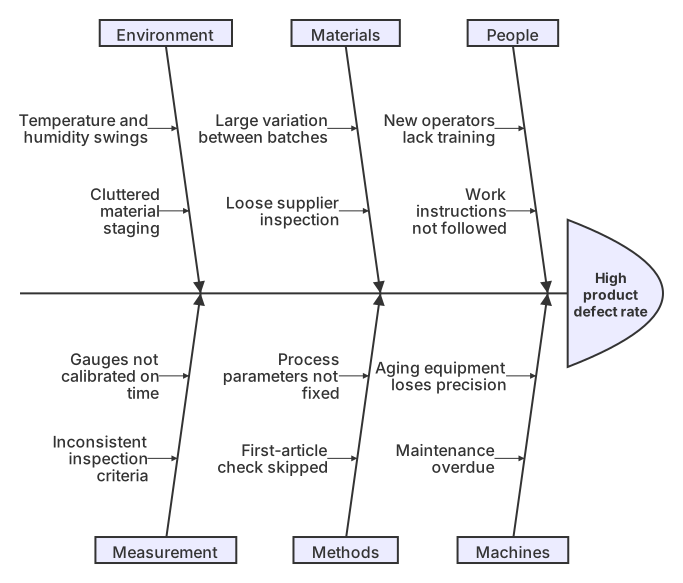
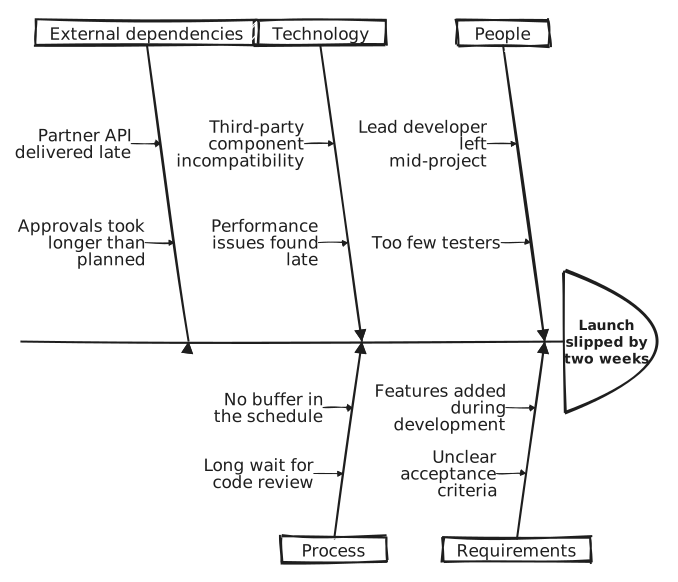
Three steps to a finished diagram
- 1Click "Open the example and edit it" above, or open the template closest to your situation in the editor
- 2Change the problem and causes in the code: one per line, and one more level of indentation makes it a sub-cause. Or send the prompt below to an AI assistant with your problem and paste its whole reply
- 3Pick a theme, then choose Export to Word or Export to PowerPoint; when a new cause comes up, add a line and export again
How to write a fishbone diagram in Mermaid
Try it: copy this and paste it into the editor to render it.
mermaid
ishikawa-beta
    Late project delivery
    People
        New hires unfamiliar with the process
        Key staff on leave
    Methods
        Requirement changes not reviewed
        No buffer in the schedule
    Tools
        Unstable test environment
        No automated tests
    Environment
        Scheduling conflicts across teams
External API delivered late- Start with ishikawa-beta (a fishbone diagram is also called an Ishikawa diagram). The second line is the problem, the head of the fish
- Each line indented one level under the problem is a main bone: a cause category such as People, Machines, Materials, Methods or Environment
- Indent one more level under a category for a specific cause; you can keep indenting for finer causes
- Lines on the same level need the same indentation, with spaces rather than tabs. If the first line says fishbone, the editor offers to change it to ishikawa-beta
Ask an AI for your own version with this structure
Send the prompt below to ChatGPT or Claude with the parts in [brackets] replaced by yours, then paste the whole reply into the editor; the code inside is detected automatically.
prompt.txt
Draw a fishbone (cause-and-effect) diagram with Mermaid ishikawa-beta syntax. The problem to analyze is [late project delivery]. Write ishikawa-beta on the first line and the problem, indented, on the second. One level deeper, add a line for each category: [People, Methods, Tools, Environment]. One more level deeper under each category, write two to four specific causes. Indent with spaces only, keep the same indentation for lines on the same level, and write plain text without brackets or symbols. Output only the mermaid code block.
Frequently asked questions
- What are the usual categories on a fishbone diagram?
- Manufacturing often uses people, machines, materials, methods and environment, sometimes with measurement added. Services and project work swap in categories such as people, process, tools, policy and external factors.
- How is a fishbone diagram different from a mind map?
- A mind map spreads out from a central idea and suits organizing knowledge. On a fishbone diagram every branch points at one problem, so it is used to find causes. In Mermaid both use indentation for levels and are written in a similar way.
- How many causes should go under one category?
- Two to five per main bone stays readable. With more, merge similar items first, or draw a separate diagram for the most important category and keep asking why.
- Why is the first line ishikawa-beta rather than fishbone?
- The diagram was introduced by Kaoru Ishikawa and Mermaid uses that name. The -beta suffix means the diagram type is still being refined and the syntax may change slightly. Written as shown here it renders and exports today.
- How can an AI assistant help with root cause analysis?
- Send the prompt on this page with your problem and some background, ask for causes by category as Mermaid code, and paste the whole reply into the editor. Treat the list as a starting point and check each cause against real data.